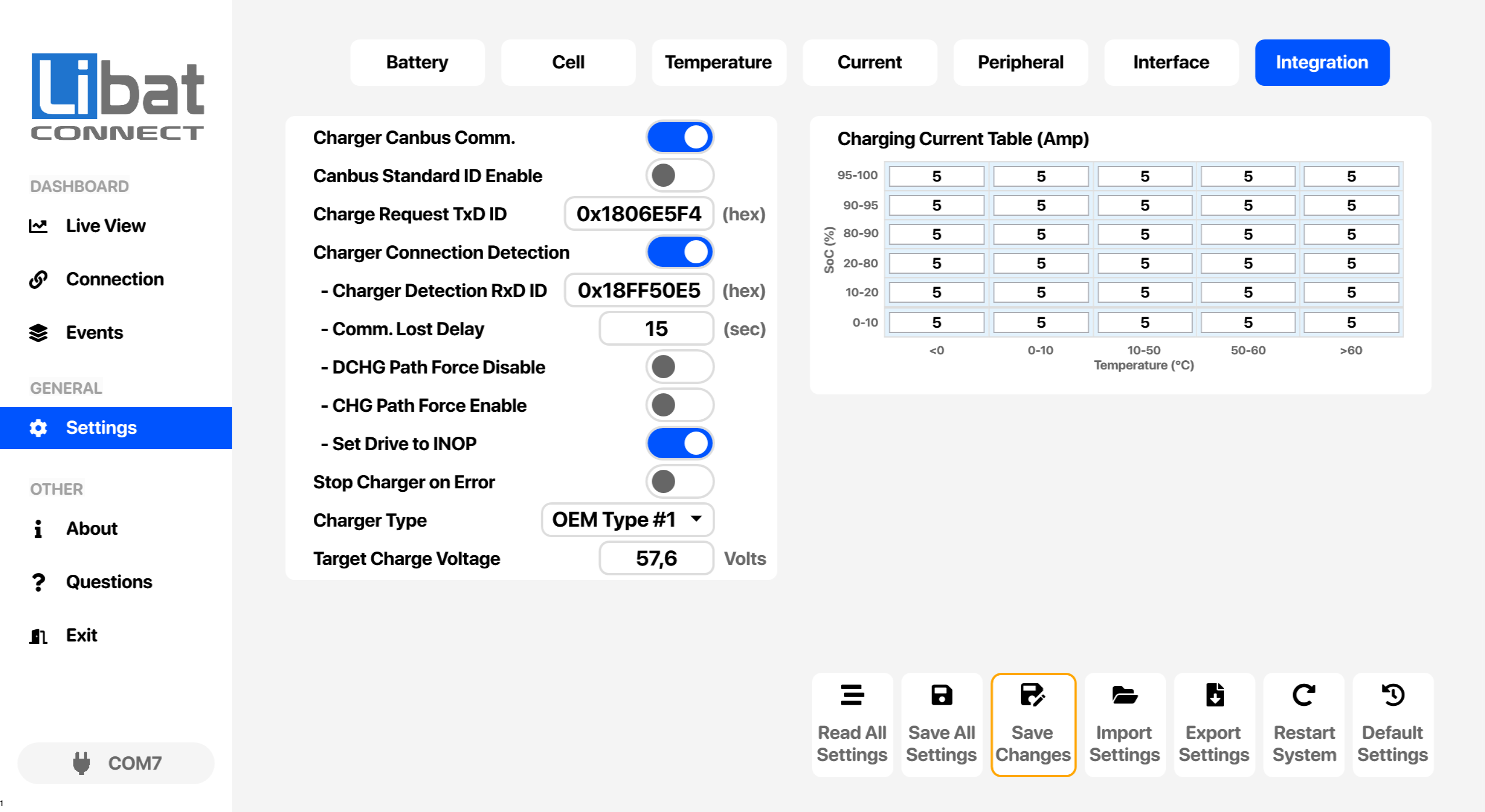
7.7 Limon™ BMS Software Integration Settings
Integration settings connect the battery management system to a digital charger over CAN bus. The BMS detects the charger, then sends charge requests with the target voltage and a charge current that follows the battery's state of charge and temperature.
Danger
Always double check your values before saving all settings.
Fig.7.7.1: Integration Settings Screen
Table.7.7.1: Integration Settings Screen Elements Descriptions
| No. |
Description |
Setting Options |
| T7 |
Selection tab for Integration settings. |
|
| M4 |
Selection tab for Settings. |
|
| S91 |
Digital charger communication over CAN bus. |
When enabled, the BMS sends charge requests to the charger. |
| S92 |
Standard CAN ID for charger frames. |
When enabled, charger frames use 11-bit standard IDs instead of 29-bit extended IDs. |
| S93 |
CAN ID of the charge request frame, in hexadecimal. |
Each charge request carries the target voltage, the charge current from the table and an enable flag. |
| S94 |
Charger connection detection. |
When enabled, the charger counts as connected only while its detection message is received. The three options below act on this detection status. |
| S95 |
CAN ID of the charger message used for detection, in hexadecimal. |
|
| S96 |
Communication lost delay in seconds. |
The charger counts as disconnected when no detection message arrives within this time. |
| S97 |
Discharge path force disable. |
Keeps the discharge path OFF while a charger is detected. |
| S98 |
Charge path force enable. |
Switches the charge path ON only when a charger is detected. |
| S99 |
Set drive to inoperative. |
Prevents discharge by the drive while a charger is detected, for example with a zero command to the motor driver. |
| S100 |
Stop charger on error. |
Requests zero charge current when the BMS has an error. |
| S101 |
Charger protocol type. |
Select the type that matches the charger.
Options: OEM Type #1, OEM Type #2, OEM Type #3, OEM Type #4 |
| S102 |
Target charge voltage sent to the charger, in volts. |
|
| S103 |
Charging current table in amperes, by SoC and temperature. |
The BMS requests the current from the cell that matches the present SoC and temperature. See the band table below. |
Table.7.7.2: Charging Current Table Bands
| SoC band (%) |
Temperature bands (°C) |
| 0–10, 11–20, 21–80, 81–90, 91–95, 96–100 |
≤ 0, 1–10, 11–50, 51–60, > 60 |
Info
Each table cell is the charge current, in amperes, that the BMS requests when both the SoC and the temperature fall into that cell's bands.