2. BMS1810 Pinouts and Descriptions
BMS1810 measures up to 18 cells on connectors 2 and 4 and drives the slave modules over the isolated daisy chain on connector 8. Power and the button come in on connectors 14 and 13, the current sensor on connector 7 and the temperature sensors on connector 9, the communication ports on connectors 11 and 12, and the inputs and outputs on connectors 6, 10 and 17. The solder pads 1, 3 and 5 carry the same pins as connectors 2, 4 and 9. Arrange the cables with the pinouts below; a number in the figures opens the table of that connector.
Danger
Check every connection and cable before you plug a connector into the BMS1810. Plug in connector 14 (supply and GND) first, then connector 2 and then connector 4; unplug in the reverse order (Connection order).
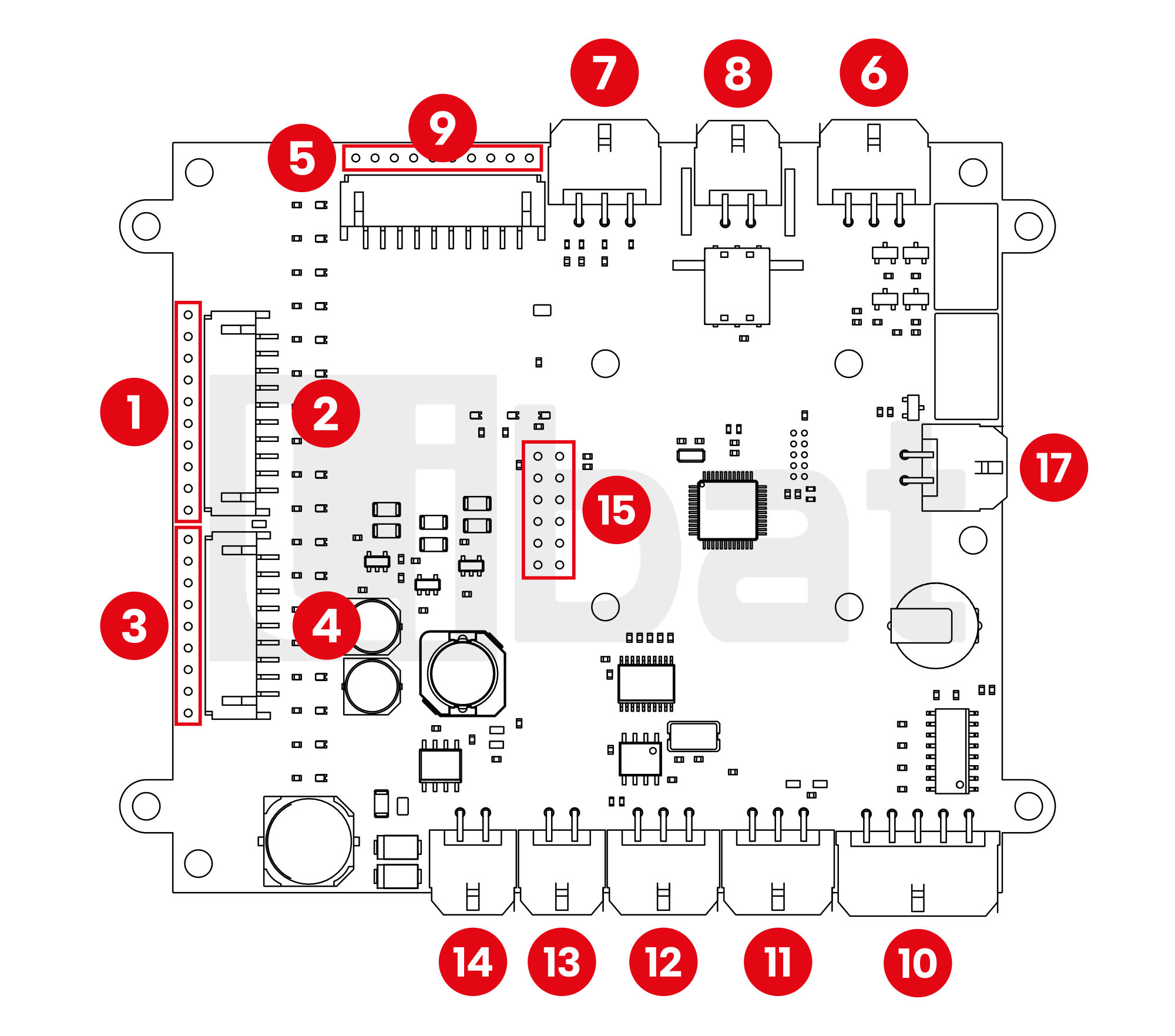
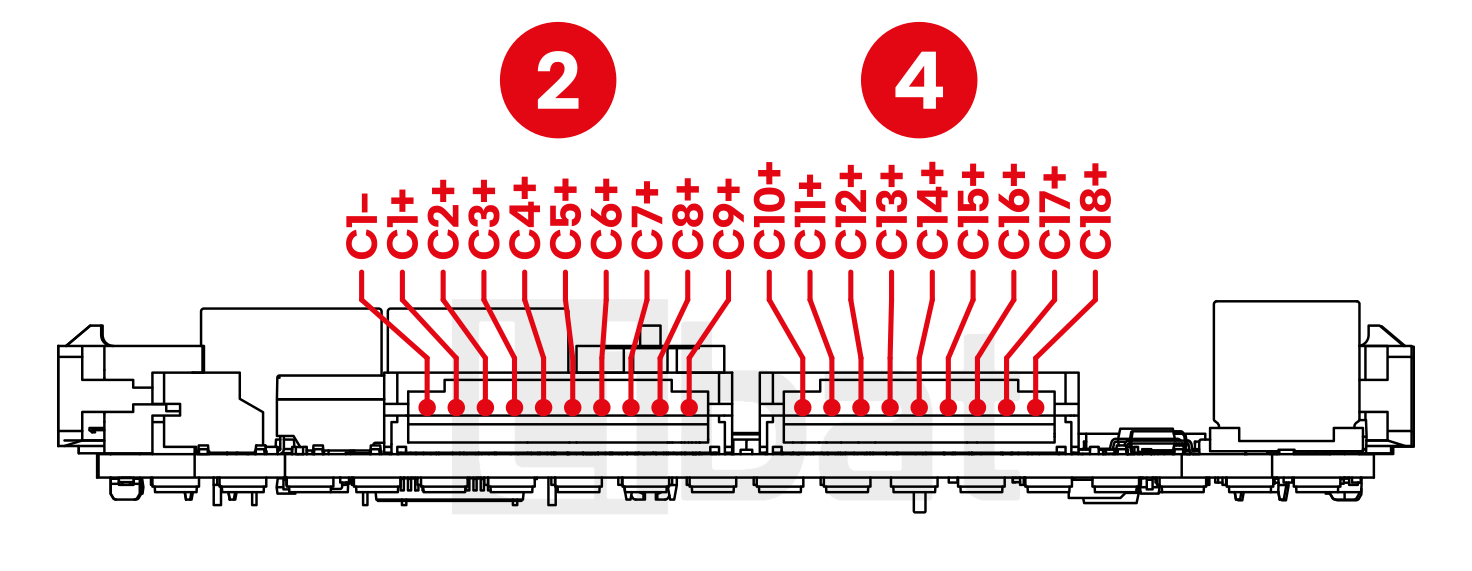
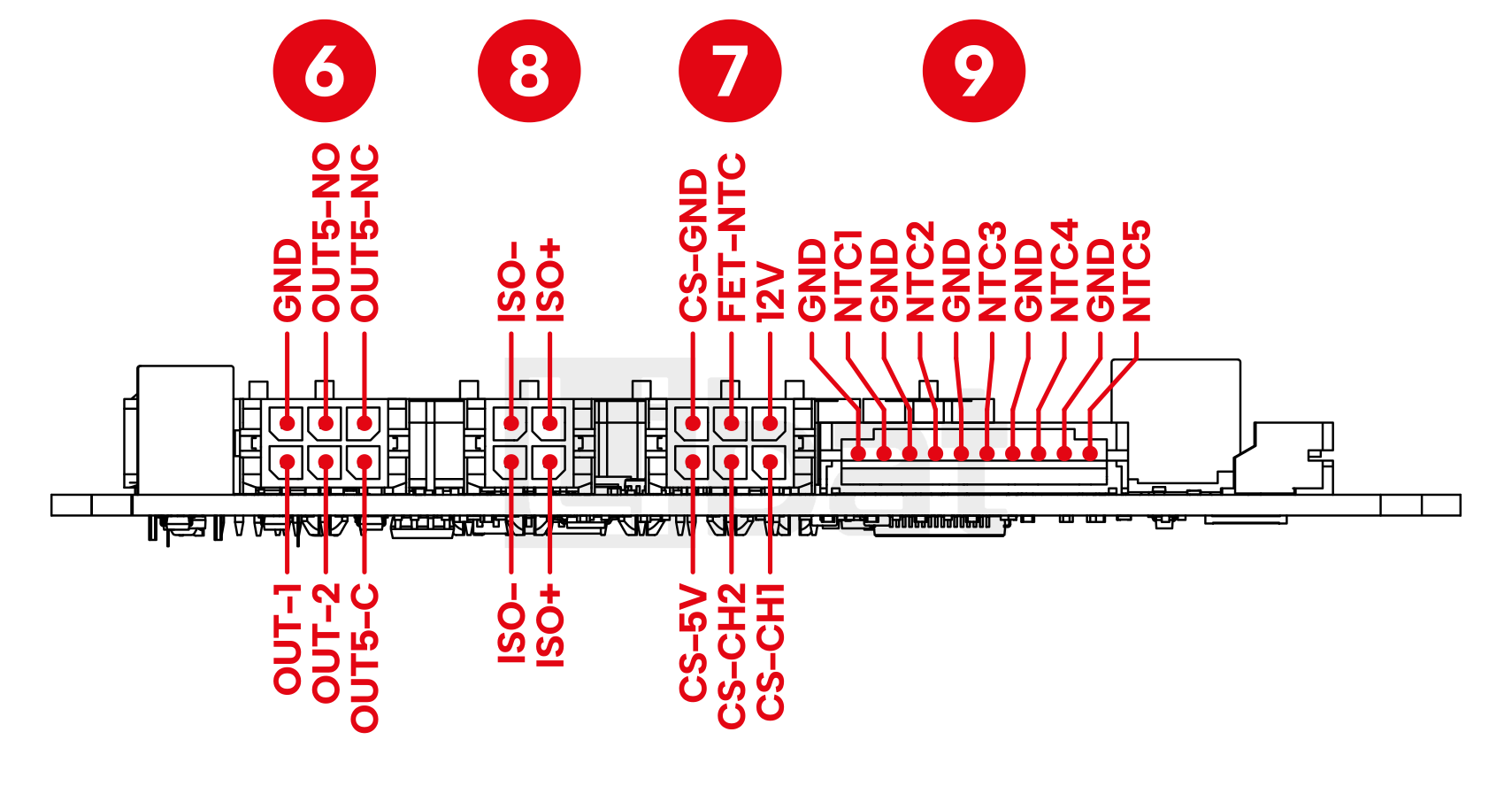
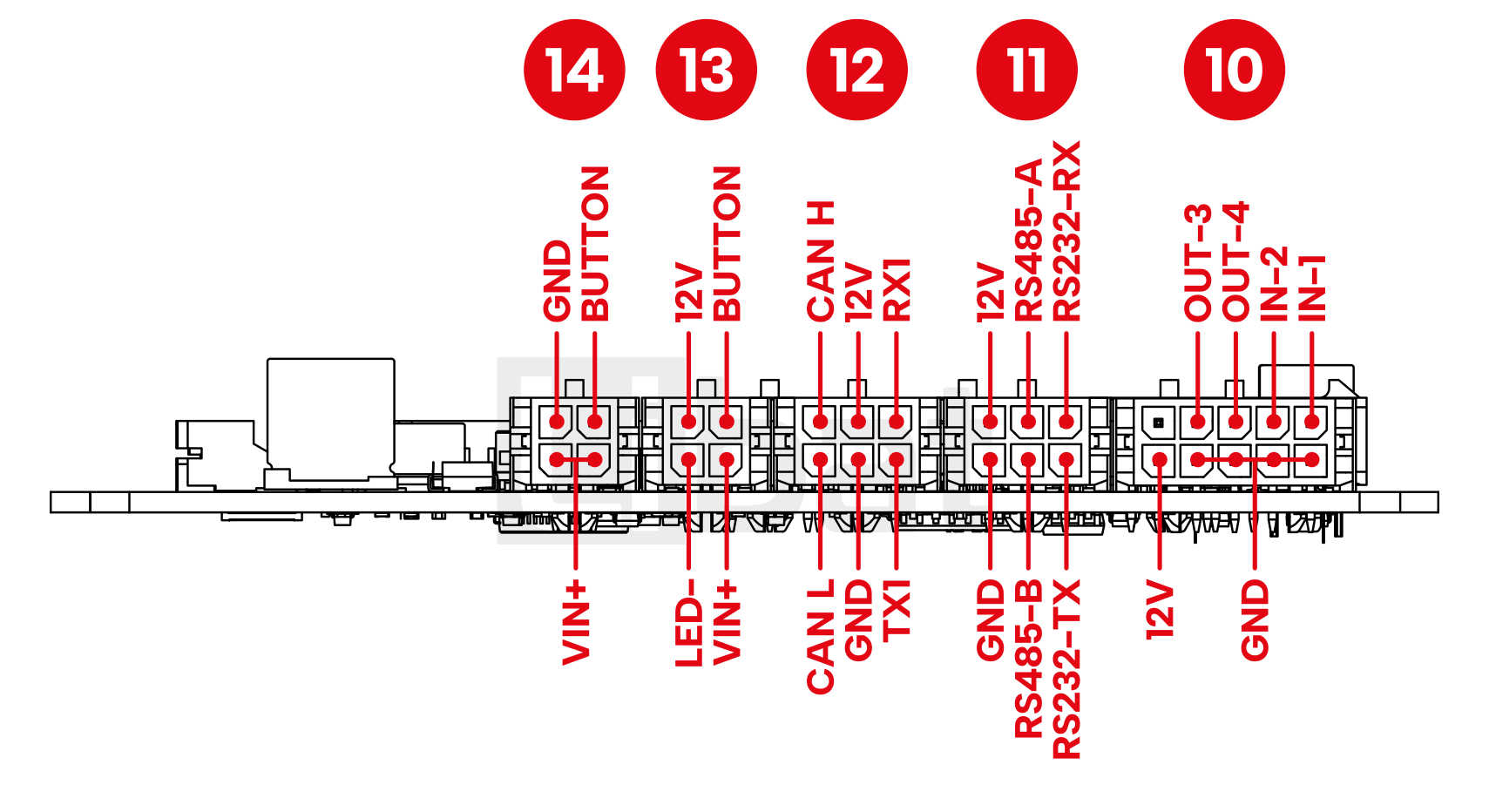
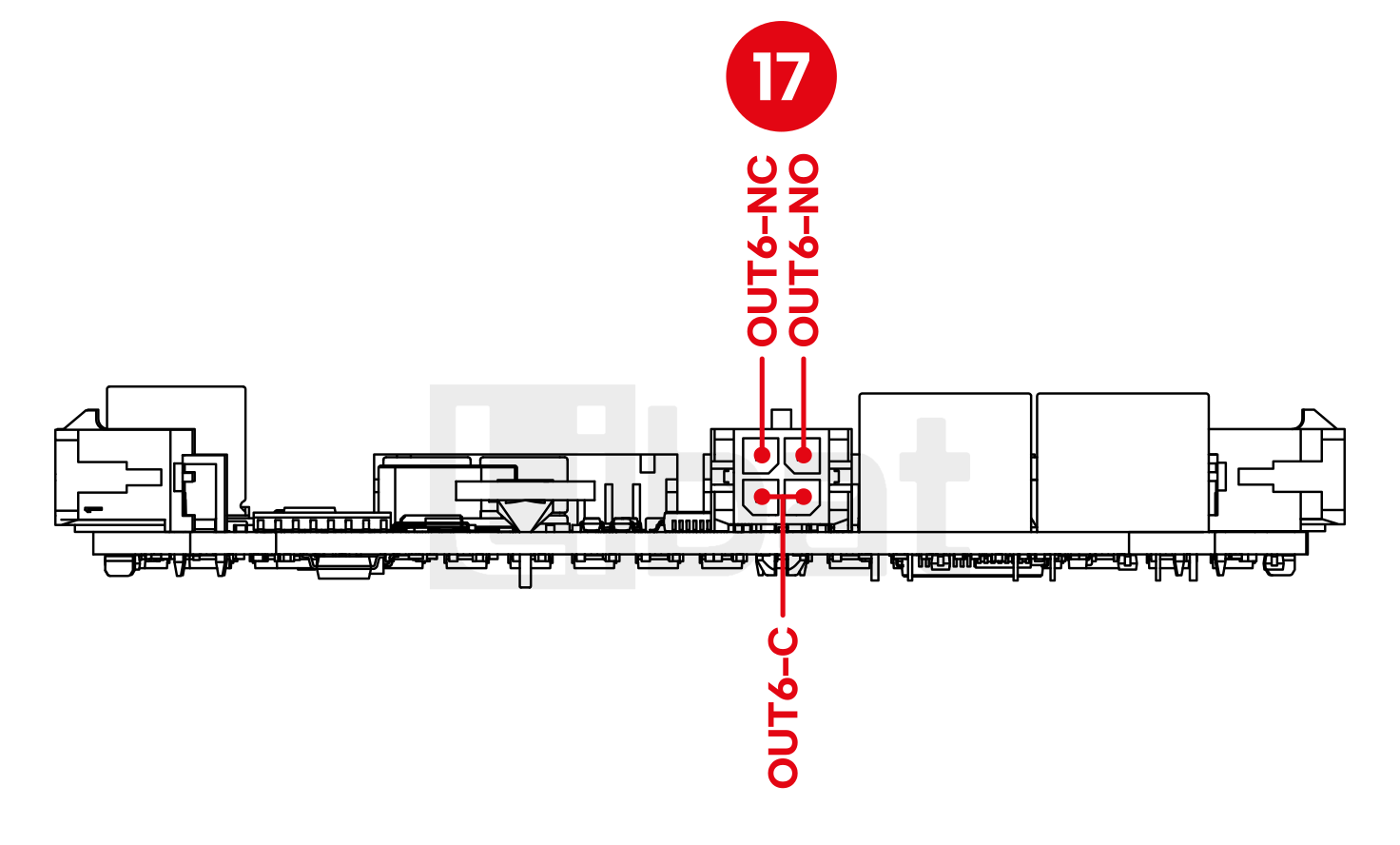
Table.2.1: Connector No#2, #1 Descriptions
| Connector No. | Pin No. | Description (see Fig.2.1 and Fig.2.2) |
|---|---|---|
| 2 | 1 | Bottom of the battery string, 1st cell's negative tab (C1-) |
| 2 | 2 | 1st cell's positive tab (C1+) |
| 2 | 3 | 2nd cell's positive tab (C2+) |
| 2 | 4 | 3rd cell's positive tab (C3+) |
| 2 | 5 | 4th cell's positive tab (C4+) |
| 2 | 6 | 5th cell's positive tab (C5+) |
| 2 | 7 | 6th cell's positive tab (C6+) |
| 2 | 8 | 7th cell's positive tab (C7+) |
| 2 | 9 | 8th cell's positive tab (C8+) |
| 2 | 10 | 9th cell's positive tab (C9+) |
| 1 | - | Solder pads for wires or a pin header, the same pins as connector 2, not fitted in the standard product |
Table.2.2: Connector No#4, #3 Descriptions
| Connector No. | Pin No. | Description (see Fig.2.1 and Fig.2.2) |
|---|---|---|
| 4 | 1 | 10th cell's positive tab (C10+) |
| 4 | 2 | 11th cell's positive tab (C11+) |
| 4 | 3 | 12th cell's positive tab (C12+) |
| 4 | 4 | 13th cell's positive tab (C13+) |
| 4 | 5 | 14th cell's positive tab (C14+) |
| 4 | 6 | 15th cell's positive tab (C15+) |
| 4 | 7 | 16th cell's positive tab (C16+) |
| 4 | 8 | 17th cell's positive tab (C17+) |
| 4 | 9 | Top of the battery string, 18th cell's positive tab (C18+) |
| 3 | - | Solder pads for wires or a pin header, the same pins as connector 4, not fitted in the standard product |
Table.2.3: Connector No#9, #5 Descriptions
| Connector No. | Pin No. | Description (see Fig.2.1 and Fig.2.3) |
|---|---|---|
| 9 | 1 | Ground (GND) of Temperature Sensor No.1 |
| 9 | 2 | External Temperature Sensor No.1 (NTC1) |
| 9 | 3 | Ground (GND) of Temperature Sensor No.2 |
| 9 | 4 | External Temperature Sensor No.2 (NTC2) |
| 9 | 5 | Ground (GND) of Temperature Sensor No.3 |
| 9 | 6 | External Temperature Sensor No.3 (NTC3) |
| 9 | 7 | Ground (GND) of Temperature Sensor No.4 |
| 9 | 8 | External Temperature Sensor No.4 (NTC4) |
| 9 | 9 | Ground (GND) of Temperature Sensor No.5 |
| 9 | 10 | External Temperature Sensor No.5 (NTC5) |
| 5 | - | Solder pads for wires or a pin header, the same pins as connector 9, not fitted in the standard product |
Table.2.4: Connector No#6 Descriptions
| Connector No. | Pin No. | Description (see Fig.2.1 and Fig.2.3) |
|---|---|---|
| 6 | 1 | Relay 1 Common Pin (LiMon OUT 5) |
| 6 | 2 | High-Side Switch Output, 12V (LiMon OUT 2) |
| 6 | 3 | High-Side Switch Output, 12V (LiMon OUT 1) |
| 6 | 4 | Relay 1 Normally Closed Pin (LiMon OUT 5) |
| 6 | 5 | Relay 1 Normally Open Pin (LiMon OUT 5) |
| 6 | 6 | Board GND |
Table.2.5: Connector No#7 Descriptions
| Connector No. | Pin No. | Description (see Fig.2.1 and Fig.2.3) |
|---|---|---|
| 7 | - | Current Sensor Connector |
| 7 | 1 | Current Sensor CH1 Sense Input (0-5V) |
| 7 | 2 | Current Sensor CH2 Sense Input (0-5V) |
| 7 | 3 | 5V Output for Current Sensor Power |
| 7 | 4 | +12V Output |
| 7 | 5 | FET Temperature Sensor Input (NTC), not used by the current firmware |
| 7 | 6 | GND for Current Sensor Power |
Table.2.6: Connector No#8 Descriptions
| Connector No. | Pin No. | Description (see Fig.2.1 and Fig.2.3) |
|---|---|---|
| 8 | - | Isolated Daisy-Chain Connector to the slave modules |
| 8 | 1 | Isolated daisy-chain communication port (ISO+) |
| 8 | 2 | Isolated daisy-chain communication port (ISO-) |
| 8 | 3 | Isolated daisy-chain communication port (ISO+) |
| 8 | 4 | Isolated daisy-chain communication port (ISO-) |
Table.2.7: Connector No#10 Descriptions
| Connector No. | Pin No. | Description (see Fig.2.1 and Fig.2.4) |
|---|---|---|
| 10 | 1, 2, 3, 4 | Board GND |
| 10 | 5 | +12V Output |
| 10 | 6 | Optocoupler Input 1, ON when connected to GND (LiMon INPUT 1) |
| 10 | 7 | Optocoupler Input 2, ON when connected to GND (LiMon INPUT 2) |
| 10 | 8 | Open-Collector Output, 10 kΩ pull-up to 12V (LiMon OUT 4) |
| 10 | 9 | Open-Collector Output, 10 kΩ pull-up to 12V (LiMon OUT 3) |
| 10 | 10 | Not Connected |
Table.2.8: Connector No#11 Descriptions
| Connector No. | Pin No. | Description (see Fig.2.1 and Fig.2.4) |
|---|---|---|
| 11 | 1 | RS232 No.0 Transmit Data (Service Port) |
| 11 | 2 | RS485 B Pin |
| 11 | 3 | Board GND |
| 11 | 4 | RS232 No.0 Receive Data (Service Port) |
| 11 | 5 | RS485 A Pin |
| 11 | 6 | +12V Output |
Table.2.9: Connector No#12 Descriptions
| Connector No. | Pin No. | Description (see Fig.2.1 and Fig.2.4) |
|---|---|---|
| 12 | 1 | RS232 No.1 Transmit Data, not used by the current firmware |
| 12 | 2 | Board GND |
| 12 | 3 | CAN 2.0b Low Pin (CAN L) |
| 12 | 4 | RS232 No.1 Receive Data, not used by the current firmware |
| 12 | 5 | +12V Output |
| 12 | 6 | CAN 2.0b High Pin (CAN H) |
Table.2.10: Connector No#13 Descriptions
| Connector No. | Pin No. | Description (see Fig.2.1 and Fig.2.4) |
|---|---|---|
| 13 | 1 | Board VIN+ Output |
| 13 | 2 | External LED- Output, switches to GND through 4.7 kΩ: an LED from pin 4 needs no resistor |
| 13 | 3 | External Button Input, a push-button to VIN+ (pin 1) starts the BMS |
| 13 | 4 | +12V Output |
Table.2.11: Connector No#14 Descriptions
| Connector No. | Pin No. | Description (see Fig.2.1 and Fig.2.4) |
|---|---|---|
| 14 | 1, 2 | Board VIN+ (Board Main Power) |
| 14 | 3 | External Button Input, a push-button to VIN+ (pin 2) starts the BMS |
| 14 | 4 | Board GND (Board Main Power) |
Table.2.12: Connector No#15 Descriptions
| Connector No. | Pin No. | Description (see Fig.2.1) |
|---|---|---|
| 15 | - | Port for LiBat Extension Board |
Table.2.13: Connector No#17 Descriptions
| Connector No. | Pin No. | Description (see Fig.2.1 and Fig.2.5) |
|---|---|---|
| 17 | 1, 2 | Relay 2 Common Pin (LiMon OUT 6) |
| 17 | 3 | Relay 2 Normally Open Pin (LiMon OUT 6) |
| 17 | 4 | Relay 2 Normally Closed Pin (LiMon OUT 6) |