4. INT101 Operation
The INT101 has no buttons or settings: the BMS runs it. Its four LEDs (connector 5) show whether it is powered, whether the GNSS module has a position fix and what the modem is doing.
4.1 Power On and Off
The BMS switches the INT101 on and off through connector 1, and the power LED shows when the board is powered. The modem and the GNSS module start as soon as the board is powered; when the BMS starts the cloud connection it first switches the INT101 off for a second, so both start from a clean state. A second control line lets the BMS switch the modem alone off and on again, for example to restart it.
After the INT101 has been off, the GNSS module needs some time before its first position fix, typically 15 to 35 s under open sky and longer near buildings or indoors; the GNSS fix LED starts blinking then.
4.2 Status LEDs
The four LEDs sit in a row on the top side, from the left: power, GNSS fix, network and transmit (Fig.2.1, connector 5). The transmit LED shows a transmit signal of the modem that the current BMS firmware does not switch on, so it normally stays off; it says nothing about the cloud connection.
Fig.4.2.1: Status LEDs
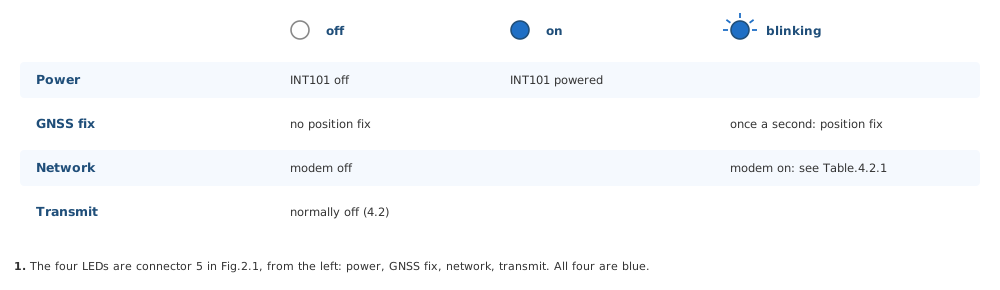
Table.4.2.1: Network LED
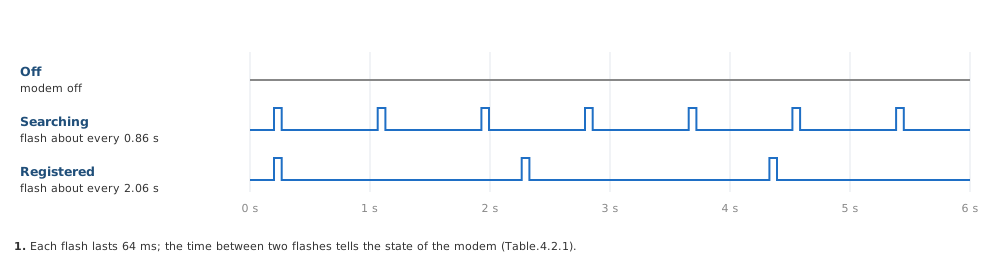
| Network LED | Modem State |
|---|---|
| Off | The modem is off |
| Short flash about every 0.86 s (64 ms on, 800 ms off) | The modem searches for the network |
| Short flash about every 2.06 s (64 ms on, 2000 ms off) | The modem is registered on the network |
Fig.4.2.2: Network LED
Tip
If the network LED keeps flashing about every 0.86 s, the modem finds no network it may use: check the GSM antenna on connector 2, the SIM card and that a 2G network is available at the place.
4.3 In LiMon™
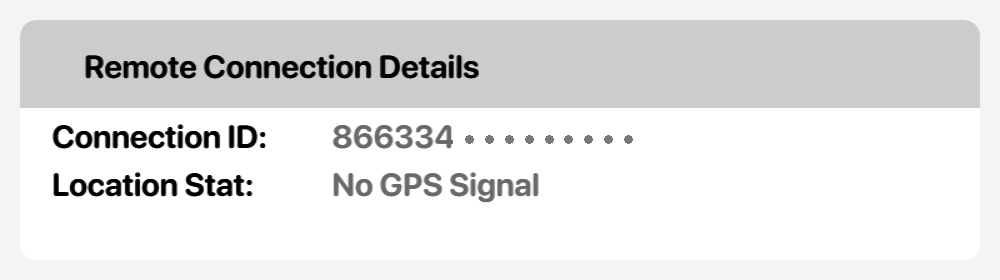
The Connection screen of LiMon™ shows the cloud connection ID of the BMS, which is the IMEI of the INT101 modem, and the GPS location status; it reads No GPS Signal until the GNSS module has a position fix.
Fig.4.3.1: Remote Connection Details in LiMon™