7.3 Limon™ BMS Software Temperature Settings
Battery management system's most important part is the settings. User must set the correct parameters of the system to achieve no errors.
Danger
Always double check your values before saving all settings.
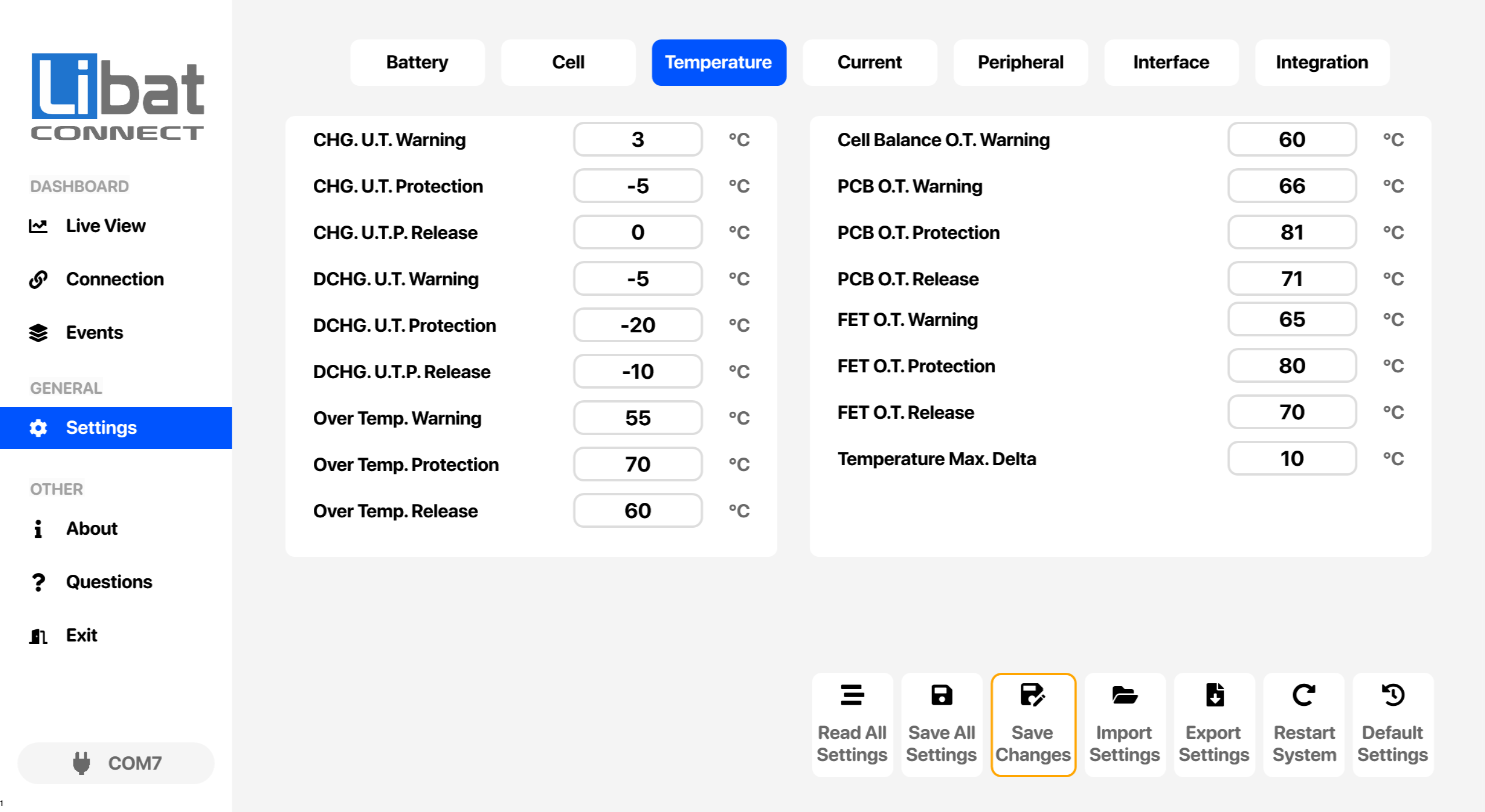
Table.7.3.1: Temperature Settings Screen Elements Descriptions
| No. | Description | Setting Options |
|---|---|---|
| T3 | Selection tab for Temperature settings. |
|
| M4 | Selection tab for Settings. |
|
| S29 | Charge Under Temperature Alarm | Triggers a warning event before reaching the charge under temperature protection. See Temperature Limits in the User Manual. |
| S30 | Charge Under Temperature Protection | Protection limit for charge under temperature. Switches off the charge path. See Temperature Limits in the User Manual. |
| S31 | Charge Under Temperature Protection Release | Release temperature value when the charge under temperature protection has been triggered. See Temperature Limits in the User Manual. |
| S32 | Discharge Under Temperature Alarm | Triggers a warning event before reaching the discharge under temperature protection. See Temperature Limits in the User Manual. |
| S33 | Discharge Under Temperature Protection | Protection limit for discharge under temperature. Switches off the discharge path. See Temperature Limits in the User Manual. |
| S34 | Discharge Under Temperature Protection Release | Release temperature value when the discharge under temperature protection has been triggered. See Temperature Limits in the User Manual. |
| S35 | Over Temperature Alarm | Triggers a warning event before reaching over temperature alarm value. See Temperature Limits in the User Manual. |
| S36 | Over Temperature Protection | Protection limit for over temperature situation. See Temperature Limits in the User Manual. |
| S37 | Over Temperature Protection Release | Release temperature value when over temperature event has been triggered. See Temperature Limits in the User Manual. |
| S38 | Cell balancing over temperature warning. | Above this temperature a Balancing Over Temperature warning is raised and cell balancing stops. The power paths are not affected. See Temperature Limits in the User Manual. |
| S39 | PCB Over Temperature Alarm | Triggers a warning event before reaching PCB over temperature alarm value. If no onboard PCB sensor installed, leave the value as it is. See Temperature Limits in the User Manual. |
| S40 | PCB Over Temperature Protection | Protection limit for PCB over temperature situation. If no onboard PCB sensor installed, leave the value as it is. See Temperature Limits in the User Manual. |
| S41 | PCB Over Temperature Protection Release | Release temperature value when PCB over temperature event has been triggered. If no onboard PCB sensor installed, leave the value as it is. See Temperature Limits in the User Manual. |
| S42 | FET Over Temperature Alarm | Triggers a warning event before reaching FET over temperature alarm value. If no onboard FET sensor installed, leave the value as it is. See Temperature Limits in the User Manual. |
| S43 | FET Over Temperature Protection | Protection limit for FET over temperature situation. If no onboard FET sensor installed, leave the value as it is. See Temperature Limits in the User Manual. |
| S44 | FET Over Temperature Protection Release | Release temperature value when FET over temperature event has been triggered. If no onboard FET sensor installed, leave the value as it is. See Temperature Limits in the User Manual. |
| S45 | Maximum Temperature Delta | Highest allowed difference between the external sensors. At or above it for about 30 s the BMS raises a CRITICAL event and switches off both paths until a restart. See Temperature Limits in the User Manual. |
Settings buttons
The buttons at the bottom of this screen are explained in 7.8 Settings Buttons.