| T5 |
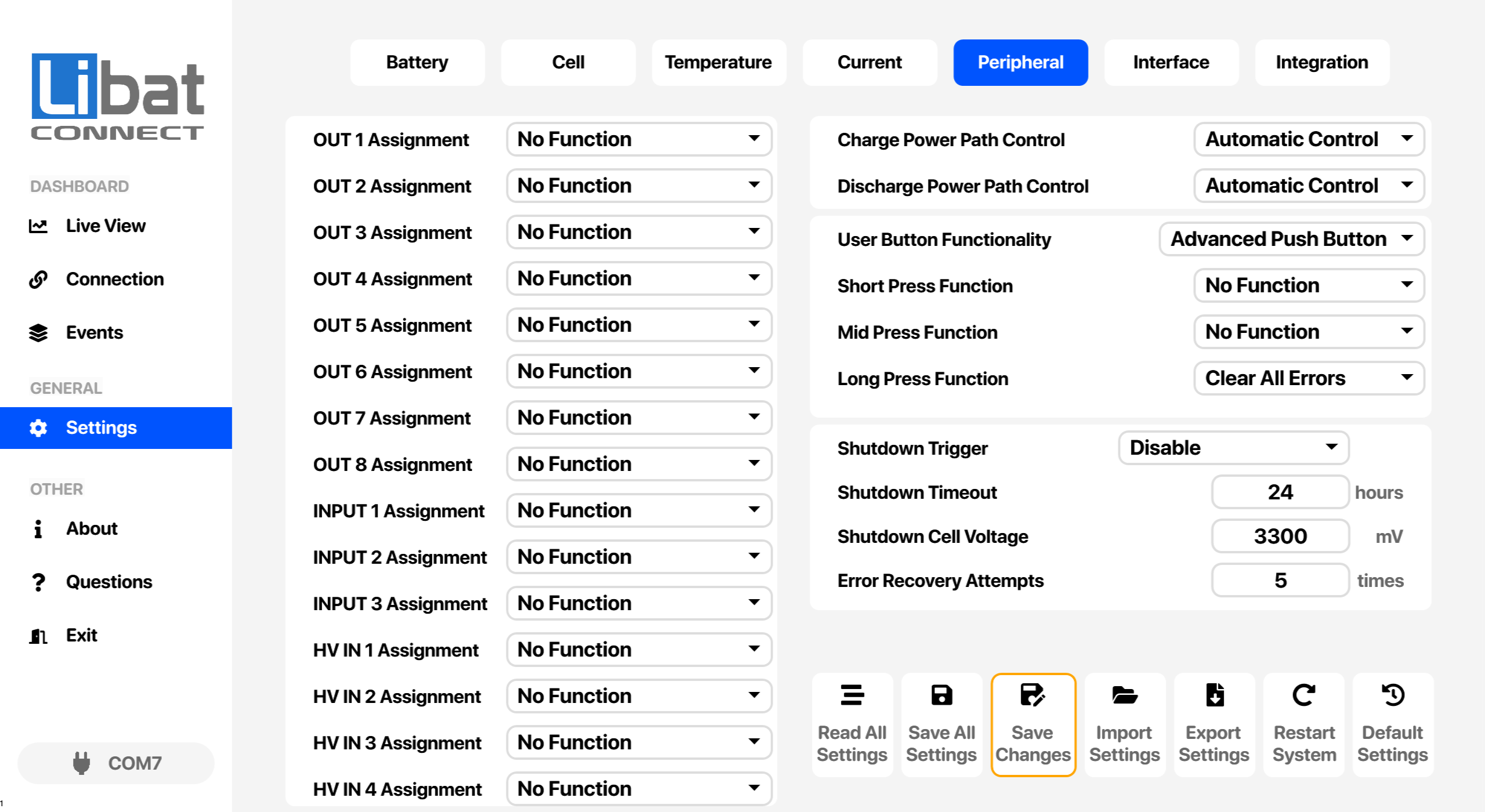
Selection tab for Peripheral settings. |
|
| M4 |
Selection tab for Settings. |
|
| S65 |
Output function assignment for defined outputs |
Assign a function to each output. See the BMS model page for the type and number of outputs, such as relay, TTL output or open drain.
No Function: The output never changes state.
Low SOC Limit-1 (≤15): Active while SoC is 15 % or lower.
Low SOC Limit-2 (≤5): Active while SoC is 5 % or lower.
Over Temperature Warning: Active while any over-temperature warning is present.
Cell Over Voltage Warning: Active while any cell over-voltage warning is present.
External Led Functionality: Follows the state of the external LED.
Main Contactor Output: Controls the main contactor of the power path.
Pre Charge Contactor Output: Controls the pre-charge circuit.
Always ON: Always active.
Charge Contactor Output: Controls the charge power path only.
Discharge Contactor Output: Controls the discharge power path only.
Cell Under Voltage Warning: Active while any cell under-voltage warning is present.
DCHG Under Temp Warning: Active while a discharge under-temperature warning is present.
CHG Under Temp Warning: Active while a charge under-temperature warning is present.
Pre Discharge Contactor Output: Controls a pre-discharge circuit with the pre-charge hold time and current limit. Second-generation boards only, such as BMS1820, BCU2002 and BMS1601.
Options: No Function, Low SOC Limit-1 (≤15), Low SOC Limit-2 (≤5), Over Temperature Warning, Cell Over Voltage Warning, External Led Functionality, Main Contactor Output, Pre Charge Contactor Output, Always ON, Charge Contactor Output, Discharge Contactor Output, Cell Under Voltage Warning, DCHG Under Temp Warning, CHG Under Temp Warning, Pre Discharge Contactor Output |
| S66 |
Input function assignment for defined inputs |
Assign a function to each input. See the BMS model page for the type and number of inputs.
No Function: The input is ignored.
Main Contactor Auxiliary: Auxiliary contact of the main contactor. The BMS uses it to detect a contactor malfunction.
Battery Output Disable: Forces the battery power path(s) OFF.
DCHG Power Path Disable: Forces the discharge power path OFF.
CHG Connector Interlock: Detects whether the charge connector is connected.
CHG Contactor Auxiliary: Auxiliary contact of the charge contactor, for malfunction detection. First-generation boards only, such as BMS1810.
DCHG Contactor Auxiliary: Auxiliary contact of the discharge contactor, for malfunction detection. First-generation boards only, such as BMS1810.
Options: No Function, Main Contactor Auxiliary, Battery Output Disable, DCHG Power Path Disable, CHG Connector Interlock, CHG Contactor Auxiliary, DCHG Contactor Auxiliary |
| S67 |
HV voltage detection input |
Detect and measure high voltage points to ensure HV path health.
Options: No Function |
| S68 |
Charge power path override control |
For testing purposes, override the status of BMS charge power path
Options: Automatic Control, Path Always ON, Path Always OFF |
| S69 |
Discharge power path override control |
For testing purposes, override the status of BMS discharge power path
Options: Automatic Control, Path Always ON, Path Always OFF |
| S70 |
User button type. |
Advanced Push Button: Short, mid and long presses run the functions assigned below. Hold the button for the required time, release it, then click once more to confirm.
Simple Push Button: Press the button twice within one second to shut the BMS down. The press assignments below are not used.
Two Way Switch: A two-position on/off switch. The BMS stays on while the switch is on and cannot shut itself down.
Options: Advanced Push Button, Two Way Switch, Simple Push Button |
| S71 |
Short Press Assignment Options |
Any press time between (1 second < Push Time < 5 seconds ) will active short press action. Click once more to approve short press action after holding proper time.
Options: No Function, Restart System, Clear All Errors, Shutdown Board, Sleep Board |
| S72 |
Mid Press Assignment Options |
Any press time between ( 5 seconds < Push Time < 10 seconds ) will active mid press action. Click once more to approve mid press action after holding proper time.
Options: No Function, Restart System, Clear All Errors, Shutdown Board, Sleep Board |
| S73 |
Long Press Assignment Options |
Any press time more than ( 10 seconds < Push Time ) will active long press action. Click once more to approve long press action after holding proper time.
Options: No Function, Restart System, Clear All Errors, Shutdown Board, Sleep Board |
| S74 |
Event that shuts the BMS down. |
Disable: The BMS never shuts down by itself.
Shutdown Timeout: Shuts down when there has been no charge or discharge current for the Shutdown Timeout below.
Shipping Mode: Shuts down 10 minutes after it is selected, for storage and transport. After the next start-up the BMS runs without automatic shutdown.
Critical Cell Voltage: Shuts down when any cell is below the Shutdown Cell Voltage below and the battery is not charging.
Timeout or Critical: Shuts down on whichever of the two happens first.
Choose carefully, because an unsuitable setting can put the BMS into a shutdown loop.
Options: Disable, Shutdown Timeout, Shipping Mode, Critical Cell Voltage, Timeout or Critical |
| S75 |
Shutdown timeout value for trigger shutdown event. |
Any battery situation except IDLE will reset timer value. |
| S76 |
Minimum Cell Voltage for trigger shutdown event. |
Any cell value under this value will trigger shutdown according to shutdown trigger selection. |
| S77 |
Error recovery retry times before user attention required event. |
If set to 0, disables retry limit and system will try to recover forever any error situation. This may cause to lower lifecycle of power path switching elements or exceeding voltage limits. Retry cycle has hysteresis to detect and recover. |