7.6 Limon™ BMS Software Interface Settings
Battery management system's most important part is the settings. User must set the correct parameters of the system to achieve no errors.
Danger
Always double check your values before saving all settings.
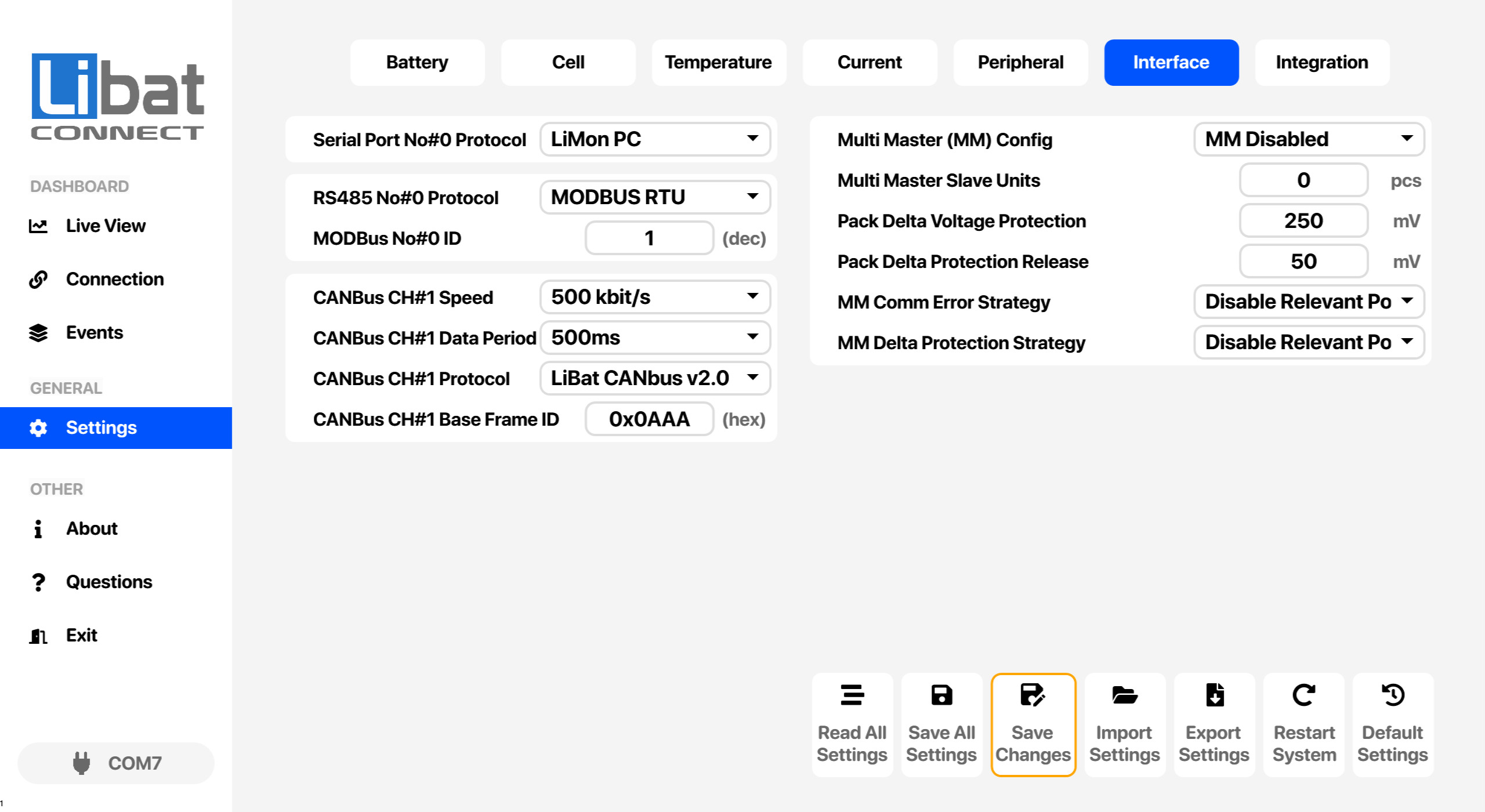
Table.7.6.1: Interface Settings Screen Elements Descriptions
| No. | Description | Setting Options |
|---|---|---|
| T6 | Selection tab for Interface settings. |
|
| M4 | Selection tab for Settings. |
|
| S78 | Serial Port No#0 Protocol. | This port using as fixed service port. LiMon PC: Deticated Protocol for PC Tool Communication Only JSON: JSON Communication. See "BMS Communication -> JSON" section for details. Options: LiMon PC, JSON |
| S79 | Multi Master (MM) configuration | Set multi master behaviour for communication of between master hardwares Options: MM Disabled, MM Main Controller, MM Slave in Series, MM Slave in Parallel |
| S80 | Number of Multi Master (MM) slave units | Set number of multi master slave units for communication of between master hardwares |
| S81 | Maximum Parallel Battery Packs Voltage Delta | Highest allowed voltage difference between parallel packs. Checked by the Multi-Master main controller; higher values may damage cables, connectors and fuses. |
| S82 | Pack delta voltage protection release. | The protection releases when the voltage difference between parallel packs drops below this value. |
| S83 | Multi-Master communication error strategy. | Action taken when the Multi-Master communication times out. Options: Do Nothing (Manual Recovery), Disable All Power Out on Comm Error and Retry, Disable Relevant Power On Comm Error and Retry |
| S84 | Multi-Master pack delta protection strategy. | Action taken when the voltage difference between parallel packs exceeds the protection limit. Options: Do Nothing (Manual Recovery), Disable All Power Out (Manual Recovery), Disable Relevant Power Out Only (Manual Recovery), Disable Relevant Power Out Only and Wait For Equalization |
| S85 | RS485 No#0 protocol selection | Select proper modbus protocol for your application. Disabled:No protocol selected or no modbus hardware MODBUS RTU: Standard Modbus RTU protocol. See "BMS Communication -> Modbus" section for details. Options: Disabled, MODBUS RTU |
| S86 | Modbus ID in Decimal Format | Set proper ID for modbus RTU protocol. See "BMS Communication -> Modbus" section for details. |
| S87 | Canbus No#0 Speed Settings | Canbus baudrate options. 125kbit/s 250kbit/s 500kbit/s 1000kbit/s Options: 125 kbit/s, 250 kbit/s, 500 kbit/s, 1000 kbit/s |
| S88 | Canbus No#0 Data Period Settings | Canbus data interval Disabled: No Periodic Data. Only Responds When Requested. 250ms: Data Send to every 250ms 500ms: Data Send to every 500ms 1000ms: Data Send to every 1000ms 1500ms: Data Send to every 1500ms 2000ms: Data Send to every 2000ms Options: Disabled, 250ms, 500ms, 1000ms, 1500ms, 2000ms |
| S89 | Canbus No#0 Port Protocol. | Select proper canbus protocol for your application. Disabled: No protocol selected or no canbus hardware LiBat CANbus v1.0: Earlier LiBat protocol, kept for existing installations; it is no longer documented here. LiBat CANbus v2.0: Current LiBat protocol, see 1.2 LiBat Canbus v2.x. OEM Custom v1.0: Customer-specific protocol for a single OEM project. Select it only when LiBat has told you to. Options: Disabled, LiBat CANbus v1.0, LiBat CANbus v2.0, OEM Custom v1.0 |
| S90 | CAN bus base frame ID in hexadecimal format | First 4 bytes of canbus ID can be customized. Set proper ID or left as it is. e.g. 2730=0xAAA, 3003=0xBBB |
Settings buttons
The buttons at the bottom of this screen are explained in 7.8 Settings Buttons.